Changelog

Release notes

Free updates. Keep an eye on the rocket icon: when it's coloured in, an update is available. You get to decide when to start an update.

2.17.1 Latest release

Climate and Charging Schedules, Notifications You Choose, and Morning Kilometres on the Right Day

New

Schedules

Controls has a new Schedules card for climate and charging. Pick the time the cabin and battery should be ready, or when charging starts and stops, choose the days, and set it to run once or every week. Schedules are saved in the car itself, so they run even when your Mac is off. ConTess also lists the schedules the car keeps for other places, with the street they belong to, so you can switch old ones off or delete them. Changes made in the car or the Tesla app show up on the next refresh.

Choose your notifications

Settings has a switch for every notification. Car started driving, Sentry on or off, and cable connected or disconnected are now off by default, since you are usually the one doing them. Unlocked and door, trunk or window open only alert when they stay that way for 10 minutes while the car is parked.

Efficiency by temperature

A new chart in Info shows how many Wh/km you use at each outside temperature, with one line saying where you are most efficient and how much more you use in the heat or the cold. It fills in as the seasons change.

What Sentry costs

Totals now shows how many hours Sentry was on and the energy it used on top of normal parked drain, with the estimated cost for the period.

Improved

  • Morning kilometres driven while your Mac was not watching the car no longer land on the previous day. When ConTess catches the car already driving, the distance goes on that day; otherwise it is placed on the day you usually drive at those hours. Earlier history is corrected too.
  • A drive caught halfway through after a short gap now shows as one trip, not two.
  • The Distance driven chart no longer colours weekends differently, so they cannot be mistaken for distance with no exact time, which stays striped.
  • Your history is better protected. ConTess keeps a copy for each of the last 7 days and one a week for the month before, now including the permanent trip and charge history, and a damaged file is recovered from its copy automatically.
  • ConTess writes far less to your disk while you drive: only new readings are saved, not the whole history on every update.
  • Incomplete or damaged data from the car can no longer throw off the History totals.
  • Settings is more compact: apart from the main card, cards start closed and open with a click. In Info, the car’s location now sits in the Vehicle card, showing the street name when the car is parked.

After updating, some past days in Distance driven may change: morning kilometres move from the evening before to the day they were driven. Totals stay the same. New schedules are created for your Home location, so set Home in ConTess first if you have not.
2.16.1

Apple Maps, a History Tab You Can Step Through, and Totals That Stay Put

New

Apple Maps

Every map in ConTess now uses Apple Maps: a clean style, a true dark mode, and a satellite view with street names. Trip and destination addresses come from Apple too. The map buttons are now simple icons: Google Maps and Destination on the left, Satellite and enlarge on the right.

Step through your history

Totals now shows the selected date, with arrows to go back or forward a day, month or year. The chart, the charges and the trips all follow the same period, and Totals shows driving time and charging time separately.

Details on the chart

Hover a bar in Distance driven to see its value large, then click it for that day or month’s distance, energy used, efficiency and energy cost. Days with nothing recorded no longer show 0 km.

The chart and charges in their own window

Click the Distance driven or Charges title to open it larger, with its own period filter. The History filter stays as it was when you close it.

Improved

  • History totals no longer jump around from one day to the next. Saved trips from a stretch when your Mac was not watching the car show up again, so distance stops moving back and forth between Distance driven and No data, and each trip keeps the energy it used.
  • Energy charged now includes charges that happened while ConTess was not watching the car but were never counted, so totals and charging costs may rise to match what you actually charged.
  • Distance with no exact time is striped on the chart and no longer counts as driving time.
  • A long drive taken while nothing was watching the car is no longer mistakenly deleted as the odometer creeping while parked.
  • The menu bar now shows range, odometer and temperatures in the units you picked in Settings.
  • The sign-in page now spells ConTess correctly.

This release also includes everything from 2.15.7, which was available for a day. After updating, Energy charged and charging costs may go up for periods where a charge was previously missed, and distance moves into the right days. Nothing you recorded is removed.

2.15.6

Household Macs, a Reconnect Banner, and More Accurate Costs

New

Multiple Macs, one Tesla account

A household licence now lets every Mac work from the same Tesla account. Set up a Mac as the first on the licence, or as another one joining it, and a joining Mac adopts the first Mac's signing key automatically, so the car only ever has to trust one key. Settings gains a Household card with a control for whether every Mac calls Tesla in the background or only the primary Mac does, using the actual number of Macs on your licence. Moving trip history onto a newly added Mac is one export and one import, and exporting the shared key asks for your confirmation in a system dialog first.

A Reconnect banner for an expired Tesla sign-in

If your Tesla sign-in expires or is revoked, ConTess now shows a clear banner with a one-click Reconnect, right where you will notice it.

Setup checks your login page too

Alongside the signing key, setup now also confirms your callback (login redirect) page is live and correctly published, so a hosting setup is fully checked before your first sign-in.

Improved

  • Trip and charging costs draw on a more precisely measured battery pack throughout the app: each drive's cost, charging totals, and the phantom drain shown while parked all reflect your car's actual battery movement more closely.
  • Trip history now lives in its own permanent record, so older trips stay available in History and Journeys well beyond the usual data window.
  • Granting a Tesla permission during setup now shows clearly as done, in full colour with no strikethrough, so each tick reads as progress.

Costs and energy figures for past trips may shift slightly after installing, now that they draw on a more precisely measured battery pack. Nothing recorded is changed or removed, only re-priced.

2.15.0

Background Refresh, One Place for Tesla Calls, Calmer Rate Limits

New

Background refresh, off when you want it off

Some owners only want ConTess talking to Tesla while they are sitting at the Mac using it. There is now a setting for exactly that. Set Background refresh to Off and ConTess asks Tesla for nothing unless its window is in front and you are using it, and the background logger stands down too. Step away and it stops; come back and it pulls one fresh reading. An active drive or charge you are watching keeps recording. Left On, which is the default, nothing changes.

A “Tesla calls” card in Settings

The three settings that decide how often ConTess asks Tesla for data (refresh while moving, While parked, and Background refresh) now sit together in one card, directly above the Fleet API budget they spend.

The background logger can be switched on

The logger keeps recording your trips while ConTess is closed, but the button to start it was not appearing. It now shows in Settings whenever the logger is not already running and Background refresh is On.

Fixed

  • When Tesla limits how many requests an account can make, ConTess showed its raw code, “Status: HTTP 429”, and kept retrying every few minutes. It now says in plain words that Tesla is limiting requests, waits five minutes and then longer before trying again, and no longer fires a burst of requests at Tesla as it opens.
  • The logger card kept saying “Active” after the logger had been stopped, and a bare “Active” beside the budget total read as though the logger were what spent it. It now reads “Logger active” or “Logger off”.
  • The While parked hint said the Relaxed setting stops asking Tesla whenever the window is not in front. That only happens with the background logger running, so the hint now says so and points to Background refresh.
2.14.0

A Much Lighter Touch on Your Tesla Credit, and Honest Drive Costs

New

ConTess uses much less of your Tesla credit

While the car sat parked, ConTess asked it for data every 90 seconds, around the clock, even when nothing had changed for days. Every one of those requests spends part of the monthly credit Tesla gives you, and asking that often also kept the car from going to sleep. Now, while it is parked and nothing is changing, ConTess asks less and less often, stretching from 90 seconds out to a quarter of an hour, and when its window is not in front it stops asking altogether and leaves the recording to the background logger. Anything that actually happens, plugging in, unlocking, the battery moving, brings it straight back to attention.

A “While parked” setting

The new behaviour is on by default and lives in Settings, next to the refresh frequency. Pick “Normal” if you would rather have the old constant 90-second polling back. Driving and charging are untouched either way: those still follow the Live / Balanced / Economy setting you already had.

A clear message when the Tesla credit runs out

Tesla gives every developer account a free monthly allowance, and when it is used up Tesla switches the app’s access off and answers every request with a technical code. ConTess used to show you that code exactly as Tesla sent it, with no explanation. Now a banner across the top says in plain words what happened, with a button that opens the Tesla developer site where you add a payment method under Billing. The “Vehicle key” row no longer reports “unknown” or offers to re-pair your key in that situation either, because the key was never the problem.

Fixed

  • A drive’s energy cost was worked out from the last charge before it, as though everything in the battery had come from there. A small Supercharger top-up on top of a pack filled at home made every drive after it look far more expensive than it really was. The price now comes from the actual mixture in the battery, and the label reads “Mixed” when the energy came from more than one place.
  • The total under the trip list was not the sum of the rows above it: it was worked out at your home rate whatever the energy had actually cost. The total, each trip, the journey details and the CSV export now all show the same figures.
  • A Supercharger invoice that carried no per-kWh rate made a drive show a cost of 0.00, presented as if it were exact. A charge at home recorded without a GPS fix was priced at the public rate.

Costs shown for past drives may shift a little after installing, because they are now worked out from what was in the battery rather than from the last charge alone. Nothing recorded is changed or removed, only re-priced.

2.13.0

Recovered Charges, Coverage-Gap Markers, Honest Drive Times

New

Charges taken while the app was off

An overnight charge, or a Supercharger stop, that happened entirely while ConTess was not running went completely unseen, and your energy and cost totals silently missed it. ConTess now reconstructs it from the battery level at each end of the gap and adds it to your totals, priced by where the car was at the time: your home tariff at home, the matched Supercharger invoice at a Supercharger, your public rate anywhere else.

A “No data” marker in History

Where coverage was lost (Mac asleep, logger stopped) and something actually happened in that window, the trip list now shows a muted “No data · app closed” row in its place, with the distance and energy estimated for that stretch. Gaps where the car only sat parked stay hidden, so the list doesn’t fill up with noise.

Honest times for drives taken while closed

While the car sleeps, Tesla’s servers can return the same frozen reading for an hour or two, then jump straight to the finished-drive state. A drive that happened in that window used to collapse into those few seconds and read as “28 km in 1 minute”. It’s now dated from the last real reading and shown with an approximate time window. The distance, energy and cost were always right. Only the clock was wrong.

Approximate-time rows read like any other

Those rows lost their gold border and gold heading. They’re now quiet, ordinary rows with a small “(approx time)” note after the date. The highlighted phrasing survives only in the expanded Time detail.

Fixed

  • The estimated cost in a trip’s details showed two currencies at once (lei and euro), left over from before the single-currency switch. It now shows only the currency you picked in Preferences.

After installing, some charges and drives that were missing may reappear in your totals and History as ConTess fills the gaps from your battery record. Nothing already recorded is changed or removed.

2.11.4

One Preferences Row, Fahrenheit and psi, Now-Playing Info

New

One Preferences row

Distance, temperature, tyre pressure, currency and language are now five dropdowns on a single Preferences row in Settings, each one like the old language menu. The temperature (°C / °F) and pressure (bar / psi) units are new, and independent of the miles or kilometres choice, so a UK setup can be miles with °C and psi.

One currency

The currency is picked once, in Preferences, and used everywhere. The separate currency selectors next to the price fields, and inside the History and Wall Connector views, are gone. The Supercharging list keeps its toggle between the display currency and Tesla's original invoice.

Now playing

The Media section under Controls now shows what is playing: the source (Spotify, radio, and so on), the track title and the artist. The play button also reflects whether audio is actually playing.

Model year and drive type

The Model line on the Info tab now reads like “Model 3 2021 AWD”, with the year and the AWD or RWD drive type read from the VIN.

Fixed

  • On a Mac set to Spanish or Romanian, a brand-new install started the whole app in that language. New installs now start in English, and the language is changed from the Preferences row in Settings.

Your existing units, currency and language carry over. If you had miles selected, temperature and tyre pressure start on metric until you switch them on the new Preferences row.

2.11.3

New Maps Provider, Vehicle Colour, and Reliability Fixes

New

Maps provider change

The previous map provider started requiring a key and stamped “API KEY REQUIRED” across the whole map. ConTess now uses OpenStreetMap’s own maps directly, with no key and no account. Dark mode and the satellite button are unchanged.

Vehicle colour in Info

The Info tab now shows your car’s paint colour, with a small colour swatch, alongside the model and odometer.

Fixed

  • The key pairing status stayed on “not paired” right after pairing, even while commands already worked (Tesla’s confirmation arrives with a delay). Now a successful command confirms the key on its own, and the status re-checks a few times after pairing instead of just once.
  • The menu-bar dropdown (next to the clock) came up in Romanian before the licence was activated, even on an English Mac. It now starts in English, like the rest of the app, until you pick another language.
  • In the detail of an “approximate time” trip (a short drive taken entirely while the app was closed), the interval showed a duration and average speed that looked exact but weren’t. It’s now labelled “approximate time”, like in the list.
  • A connection dropped while driving could freeze the last live “driving” frame on screen under the “data from HH:MM” badge. The screen now falls back to the last-known state once the data is no longer fresh. The trips total also shows the period’s cost.
  • The update button (the rocket next to the connection dot) now lights up on its own within a few seconds of launch when a new version is ready. Before, it could stay grey until the next time you opened the app.

The map looks a little different now that it’s OpenStreetMap, but your saved home, destinations and trip history are unchanged.

2.11.1

In-App Updates, Reorderable Tabs, and Trip-History Fixes

New

In-app updates

ConTess now checks for new versions on its own and installs them in two clicks. Keep an eye on the rocket icon: when it's coloured in, an update is available. You get to decide when to start an update.

Reorder your tabs

Drag the tabs along the top bar into whatever order suits you. The order is remembered on this Mac.

Info and Settings, split

Info is at‑a‑glance status: vehicle, state and location, battery health, degradation, Fleet API budget. Settings holds everything you configure: vehicle key, Wall Connector, units, prices, tariff, refresh cadence, home, developer account, licence.

Tidier Settings

Region and Units are at the top now, where they're used most. If you don't have a Tesla Wall Connector, its setup row stays collapsed behind a "Configure" toggle instead of sitting open.

Fixed

  • Short trips taken entirely while your Mac was asleep or ConTess was closed could be mistaken for a parked car's odometer creep and left out of your history. Those drives are kept now, shown with an approximate time when the exact timing isn't known.
  • Arriving home now closes a journey, and the next drive away from home starts a new one. A day with several separate outings shows as several journeys instead of one long combined one. Individual trips are unchanged, only how they're grouped.
  • A journey leg with unknown exact timing could show a duration that looked precise but wasn't. It's now labelled "approximate time" like everywhere else in the app.
  • The background logger stopped collecting detailed data whenever Tesla's own status briefly said "offline", even if the car was actually awake and driving (Tesla's status can lag hours behind reality). It now checks the car directly and keeps recording whenever it's reachable, so fewer drives are missed. A car that's genuinely offline is still left alone, and the monthly API budget cap still applies.
  • "Detect from car's location" now also sets the currency on the price fields (home and public charging tariff), not just the display currency, so the one button syncs everything.
  • Two currency controls in Settings (the public price field and its currency selector) showed Romanian tooltips no matter the app's language. Fixed in English and Spanish.
  • During setup, a hosting site that asks visitors to log in (for example Netlify with visitor access turned on) made the wizard wait forever for the public key file to appear. It now recognises that case, and tells you the host is asking for a login and how to turn it off.

This update doesn't rewrite your existing history. After installing, some drives that were missing may reappear, and days with multiple outings will regroup into more journeys. Nothing is removed.

2.11.0

Imperial Units, GBP currency, Ability to set Units based on car location

New

Miles & imperial units

Settings → Units now has a km/mi toggle that converts distance, speed (km/h↔mph), efficiency (Wh/km↔Wh/mi) and tyre pressure (bar↔psi) everywhere they're shown: hero, trips, journeys, history, battery health, charging.

Detect from car's location

One button in Settings reads the car's GPS and sets language, currency and units together to match wherever the car actually is (Germany → English/EUR/km, US → English/USD/miles). It also fixes date and time formatting, so a US install gets a 12‑hour clock and M/D/Y dates instead of always defaulting to UK style.

GBP support

British pounds joins RON, EUR and USD as a full 4th currency.

Estimated pack capacity while charging

The Charging tab now shows estimated pack capacity at your current charge limit (e.g. “≈ 61 kWh at 80%”), live as you drag the slider.

Richer CSV export

Export now follows your unit and currency settings, and gained cost and currency columns it never had before.

Fixed

  • The dashboard could get stuck showing live driving data (speed, the "Driving" badge) even after the car fell asleep or the connection dropped. It now correctly collapses to the parked view.
  • Language reverted to Romanian after restarting the app from the setup wizard: the screens rendered directly (connect account, vehicle picker, sign out) now respect your chosen language.
  • The setup wizard offered to pair the car's key before your Tesla account was actually connected, which was guaranteed to fail; pairing now only happens after login, from inside the app.
  • The charge‑limit slider's "80%" mark wasn't lined up with the actual slider position.
  • "Open in Google Maps" and the map's own attribution text used to print on top of each other; they're in separate corners now, and the attribution is smaller and less intrusive.
  • The dark‑mode map was very hard to read (near‑black on near‑black); brightened just that tile layer.
  • Fixed a real bug where the odometer occasionally creeps 1–4 km while genuinely parked (weak GPS/Sentry), which was showing up as a fake overnight "trip" with an "approximate time" label. Those are now correctly filtered out.
  • History now explains that Tesla gives no retroactive trip log (so recorded trips only start from install), while pointing out that full Supercharging history is available under the Charging tab.
  • "Estimated capacity" on the battery‑health card was unlabeled as the full‑pack figure and used a formula that ran about 17% high; relabeled "(100%)" and switched to your car's actual measured pack size.
2.10.1

Journeys, Real charging cost, Adjustable polling

New

Journeys

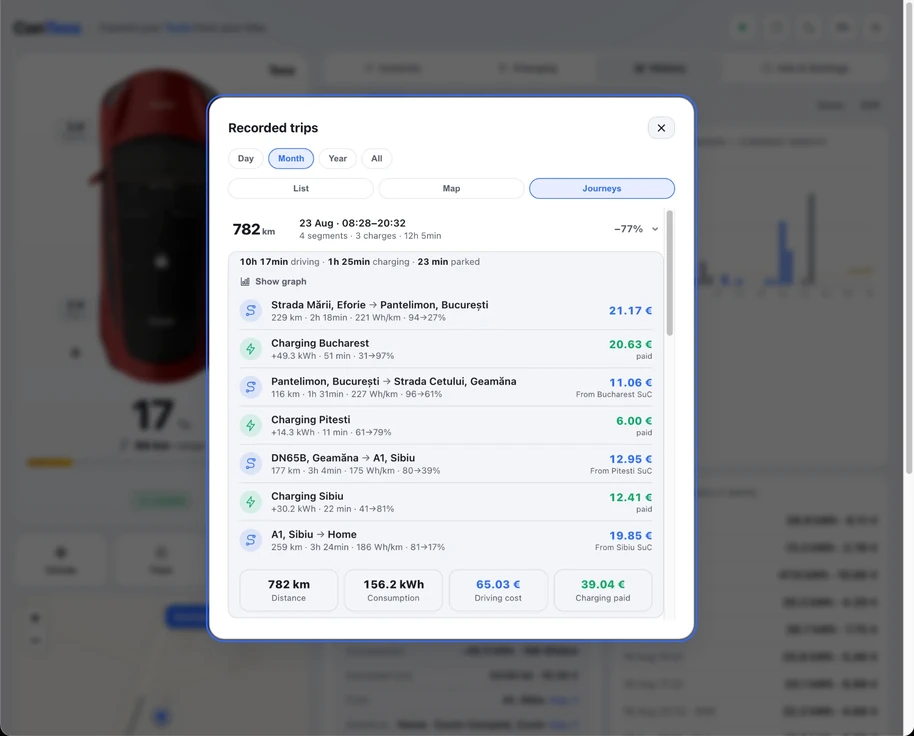
History now groups related stops into a single trip narrative (e.g. "home → office → home") instead of a flat list of drive segments, with a per‑leg breakdown of route, energy source and cost.

Real charging costs

Charging costs are now priced by their real source: home tariff, your configured public rate, or a matched Supercharger invoice weighted for a period, instead of always assuming the home rate. Totals and Journeys can no longer disagree with each other.

Configurable public rate

A public charging rate in Settings, used whenever a charge can't be matched to a home or Supercharger session.

Adjustable polling

Choose how often the app checks in while driving or charging: Live 30s, Balanced 60s, or Economy 2 min. Defaults to Balanced.

The Journeys view open, showing a recorded 782 km trip broken into driving legs and Supercharger stops, each priced individually.

Fixed

  • The background logger no longer double‑polls the same drive the app is already watching live.
  • Fleet API spend is now tracked on one combined ledger (app + logger) against a hard $25 cap, rather than each tracking its own budget separately.
  • Tray/status‑bar menu text was rendered in dimmed grey and hard to read; also fixed notifications not displaying at all on properly signed builds (a signing‑identity mismatch).
  • Wall Connector lifetime stats relabeled for clarity; duplicate street suggestions in the destination search collapsed.

Free updates, forever. One purchase, no subscription. Your licence is yours for life.